MeetBridge TeamBy MeetBridge Team
July 13, 2026

MeetBridge vs Zoom Voice Translator: Which Is Better for Global Business Meetings?

Compare MeetBridge vs Zoom Voice Translator for live translation, languages, transcripts, meeting summaries, guest access, pricing, and global business workflows.

live meeting translationlive meeting translatormeetbridgemeeting translation softwaremultilingual meetingsreal time meeting translationtool comparisonsZoom
MeetBridge vs Zoom Voice Translator: Which Is Better for Global Business Meetings?

MeetBridge vs Zoom Voice Translator: Which Is Better for Global Business Meetings?

MeetBridge and Zoom Voice Translator both help people communicate across languages, but they solve different-sized problems.

The short answer: Zoom Voice Translator is the more convenient choice for an eligible team that already runs every call in Zoom and wants speech-to-speech translation inside the Zoom desktop app. MeetBridge is the stronger fit when live translation is part of a larger business workflow that also needs meeting preparation, transcripts, searchable history, summaries, decisions, action items, and reliable follow-up.

That distinction matters. A multilingual business meeting is rarely successful just because participants heard translated audio. A sales team still needs to capture the buyer's requirements. A recruiter needs a reviewable interview record. A customer success manager needs to document commitments. An export team needs exact delivery, pricing, and specification details after the call.

Zoom Voice Translator focuses primarily on helping participants hear the live conversation in another language. MeetBridge is designed to connect live translation with transcripts and meeting memory, meeting summaries and actions, booking links, and team follow-up.

This comparison explains where each product is strongest, where the current Zoom beta has practical limits, and which option makes more sense for global sales, hiring, customer success, consulting, and operations teams.

Research note: Zoom product details in this article were reviewed on July 14, 2026. Zoom currently describes Voice Translator as a beta feature, so availability, supported languages, usage limits, and pricing may change. Confirm current details in Zoom's official documentation before purchasing.

MeetBridge vs Zoom Voice Translator: the quick verdict

Choose Zoom Voice Translator when:

  • Your company is already standardized on Zoom.
  • Your account and region are eligible for the current beta.
  • Participants use the Zoom desktop app on Windows or macOS.
  • Your required language is among the five currently listed for Voice Translator.
  • The immediate goal is to hear the live meeting in another language.
  • You are comfortable assembling transcripts, summaries, scheduling, and follow-up through separate Zoom features or other tools.

Choose MeetBridge when:

  • Multilingual meetings are a recurring customer, hiring, or operational workflow.
  • Translation must stay connected to the transcript and meeting history.
  • The team needs decisions, action items, owners, and follow-up after the call.
  • External meetings need preparation through booking links and custom questions.
  • Sales, HR, customer success, consulting, or operations teams need a shared meeting record.
  • You want a purpose-built multilingual meeting workspace rather than translation added to a general video meeting platform.

For a wider category comparison beyond these two products, read Best Real-Time Meeting Translation Software in 2026.

MeetBridge vs Zoom Voice Translator at a glance

Evaluation areaMeetBridgeZoom Voice TranslatorBetter fit
Primary purposeEnd-to-end multilingual meeting workflowSpeech-to-speech translation inside Zoom meetingsDepends on whether you need a workflow or a feature
Meeting environmentMeetBridge meeting room with booking, live conversation, records, and follow-upZoom desktop meetingZoom for Zoom-native teams; MeetBridge for purpose-built multilingual meetings
Live translationLive translation connected to transcript contextAI-generated translated speech played inside ZoomBoth, but in different product environments
Current availabilityAvailable as the core MeetBridge product experienceBeta for eligible Zoom customers in US clustersMeetBridge for predictable rollout; Zoom for eligible beta users
Language availabilityBuilt for multilingual business meetings; test the exact language pairs and terminology your team needsCurrent Voice Translator beta lists English, Chinese, French, Japanese, and SpanishDepends on the required language pair
Desktop and mobileWeb workflow plus current MeetBridge app and desktop optionsCurrent Voice Translator requirements specify Zoom desktop app 7.0.0 or later on Windows or macOSDepends on participant devices
Transcript and meeting memoryCore product layer connected to meeting historyAvailable through broader Zoom caption, transcript, recording, and AI features, not Voice Translator aloneMeetBridge for a unified multilingual record
Summaries and next stepsSummaries, decisions, actions, and follow-up context are part of the product workflowZoom AI Companion can provide meeting summaries and next steps when separately available and enabledMeetBridge for an integrated workflow; Zoom for teams already configured around AI Companion
Booking and preparationPublic booking links and custom pre-meeting questionsNot part of Voice Translator itselfMeetBridge
Usage and pricingPublic plans list team capacity and meeting hoursBeta provides limited free evaluation hours; paid add-on pricing was not yet published in the reviewed documentationMeetBridge for current pricing visibility
Best use caseRecurring external or cross-functional multilingual business meetingsTranslation inside an existing eligible Zoom meetingDepends on workflow depth

The table shows why this is not a simple feature-for-feature contest. Zoom Voice Translator is one capability inside Zoom Workplace. MeetBridge is built around the complete lifecycle of a multilingual business meeting.

What is Zoom Voice Translator?

Zoom Voice Translator is an AI-powered speech-to-speech translation feature inside Zoom meetings. It processes spoken language, translates it, and generates synthetic speech in the listener's selected language.

During a meeting, a participant can select:

  • The language they speak.
  • The language they want to hear.
  • The balance between the original and translated audio.
  • An available translated voice style.

This is different from reading translated captions. The feature produces translated audio so the participant can listen to the meeting in another language.

That is a meaningful advantage for teams already comfortable in Zoom. There is no need to introduce a different meeting environment just to test voice translation. The feature appears within the meeting controls, and each eligible participant can configure the language they want to hear.

Zoom also explains an important behavior difference between short and long speech. Short statements receive near-real-time interpretation. For longer continuous speech, interpreted audio may play after the speaker pauses. Teams should test this carefully because turn-taking delay can feel very different in a presentation, negotiation, interview, or rapid Q&A session.

Current Zoom Voice Translator beta requirements

At the time of research, Zoom lists the following requirements and limitations:

  • Voice Translator is a beta feature.
  • It requires a Zoom Pro, Business, or Enterprise account.
  • An admin must enable the feature.
  • It requires Zoom desktop app version 7.0.0 or later on Windows or macOS.
  • It is currently available to customers in US clusters.
  • The current beta supports English, Chinese, French, Japanese, and Spanish.
  • Eligible users receive five hours every 30 days during the beta, for ten hours total across the 60-day evaluation.
  • Speaking and preferred-language settings can only be configured during the meeting.
  • Zoom expects the feature to become a paid add-on after the beta, but the reviewed documentation does not publish the future add-on price.

These are beta conditions, not necessarily the final commercial terms. Still, they matter for a purchasing decision today. A global company should not plan a full rollout before checking account eligibility, cluster availability, user devices, required languages, and expected monthly usage.

Zoom Voice Translator beta requirements including languages, desktop access, region, and usage limits

Zoom Voice Translator is not the same as Zoom translated captions

Buyers should separate three related Zoom capabilities:

  1. Voice Translator: translated synthetic speech that a participant hears during the meeting.
  2. Translated captions: translated text displayed on screen.
  3. AI Companion meeting features: broader capabilities such as meeting summaries and next steps when available and enabled.

Zoom's translated captions support a much broader language list than the current five-language Voice Translator beta. That does not mean all of those languages are available for translated voice. Teams comparing products should ask whether they need translated text, translated audio, or both.

Zoom's broader platform can also generate meeting summaries and next steps through AI Companion. That is a real strength for organizations already licensed and configured for those features. However, those capabilities should not be attributed to Voice Translator itself. The live translation feature, captions, transcript, recording, AI summary, scheduler, and chat may have different requirements, settings, and commercial terms.

For a deeper explanation of the output difference, read Live Translation vs Translated Captions: What Is the Difference?.

What is MeetBridge?

MeetBridge is a multilingual meeting platform built around a connected workflow: prepare the meeting, hold the conversation across languages, preserve the record, and turn the outcome into follow-up.

Its product model includes:

MeetBridge is not trying to be a general collaboration suite with translation added as one optional control. Its central job is to help people meet in different languages without losing the business context before, during, or after the call.

That makes it particularly relevant for meetings where the live conversation creates downstream work:

  • A discovery call creates a proposal and sales follow-up.
  • An interview creates a hiring decision and next-round plan.
  • An onboarding call creates configuration tasks and customer commitments.
  • A consulting workshop creates decisions, risks, and project actions.
  • A supplier negotiation creates pricing, specification, quality, and delivery obligations.

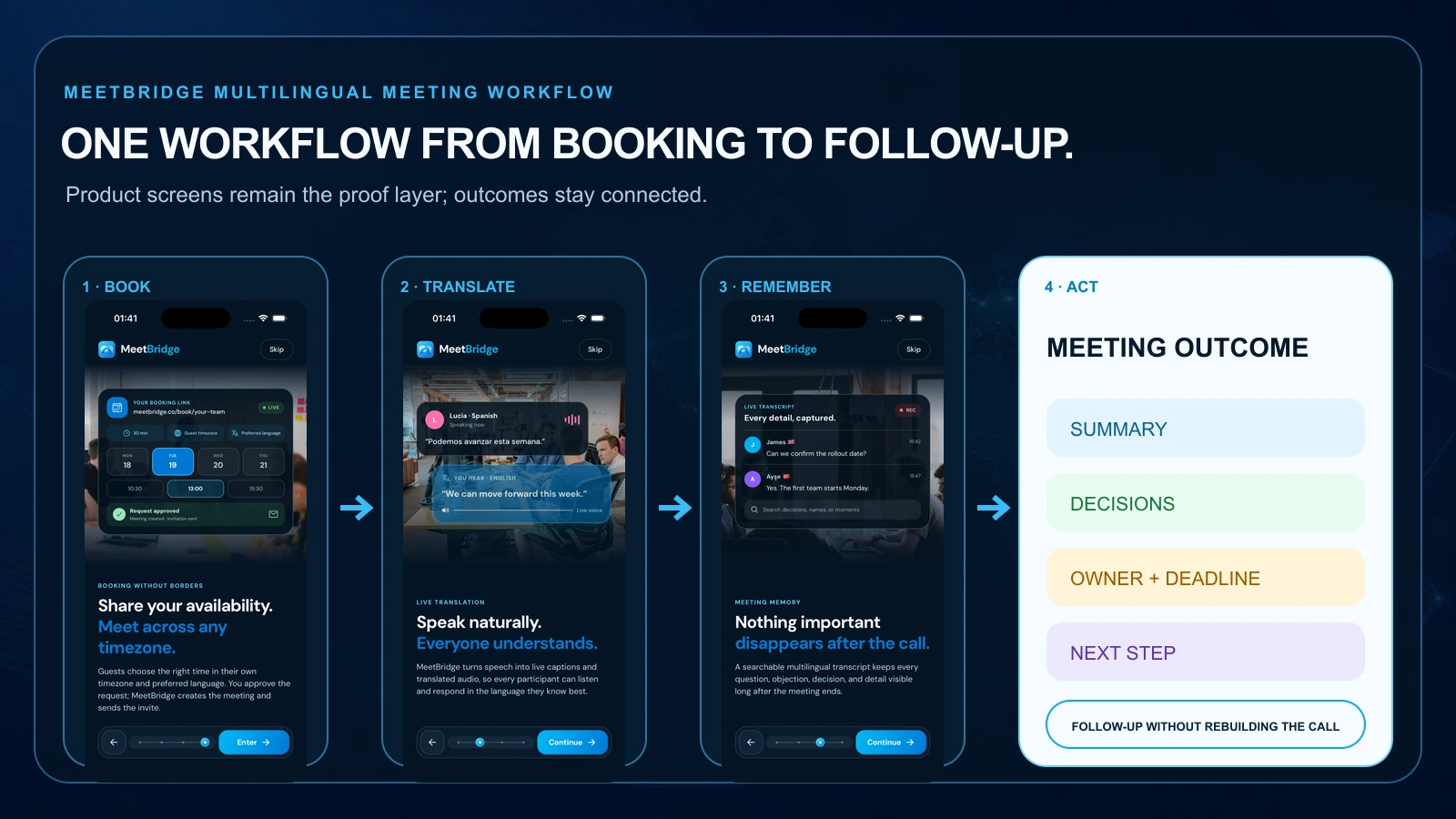
The MeetBridge product overview describes this as one workflow from booking to follow-up. That workflow orientation is the biggest difference in this comparison.

MeetBridge workflow connecting booking, live translation, transcript, meeting summary, decisions, and actions

1) Live translation experience

Both products aim to reduce language friction during a live meeting, but the experience begins from a different place.

Zoom's advantage: translation inside a familiar meeting tool

For companies already using Zoom, the main advantage is obvious: the participant stays inside Zoom. Voice Translator is available from the meeting controls for eligible users. Participants can adjust the original and translated audio balance and select a translated voice style.

That familiarity can reduce internal adoption work. Employees do not need to learn a new meeting platform just to evaluate translated voice. For a recurring internal call between teams in supported languages, this may be enough.

The tradeoff is that the feature inherits the current beta restrictions. The team needs the right account, the right cluster, the right app version, a supported desktop operating system, and one of the five listed languages. Usage is also limited during the beta.

MeetBridge's advantage: translation is the center of the room

MeetBridge treats language as a core part of the meeting rather than an optional enhancement. The live conversation is designed to remain connected to transcript context and the meeting record.

This matters when participants need more than translated audio. During a buyer call, for example, the team may need to revisit the exact objection after the meeting. During a supplier negotiation, procurement may need to confirm whether a delivery date was proposed or committed. During an interview, a hiring panel may need to review the candidate's full answer instead of relying on one listener's memory.

For these workflows, the live experience and the record should be evaluated together.

What to test in both products

Do not choose either product from a polished demo alone. Run real conversations and observe:

  • Delay during short questions and longer answers.
  • Whether participants interrupt the translated audio.
  • Accuracy with names, product terms, acronyms, prices, and dates.
  • Regional accents and non-native speakers.
  • Mixed-language moments.
  • How easily participants correct a misunderstanding.
  • Whether the transcript preserves enough context to review the moment later.

Translation quality varies with language pair, audio quality, network conditions, speaking clarity, and terminology. No responsible product comparison should promise perfect interpretation in every situation.

2) Language coverage

Language count is important, but it is often evaluated badly.

Zoom currently lists five languages for the Voice Translator beta: English, Chinese, French, Japanese, and Spanish. Its translated-caption product supports a broader list, but buyers should not treat caption support as voice-translation support.

MeetBridge is built for multilingual meeting workflows, but the right purchasing question is not simply, "How many languages appear on a list?" The team should confirm the exact source and target languages needed for its real calls and test them with relevant terminology.

For example:

  • An English-Spanish sales team should test fast objection handling and pricing language.
  • A Turkish-English export team should test specifications, quantities, delivery terms, and payment vocabulary.
  • A multilingual recruiting team should test long candidate answers, job titles, and company-specific terminology.
  • A health tourism team should test its language pair while keeping appropriate professional review for medical information.

A product with a long language list can still be the wrong choice if it performs poorly on the two pairs that matter to your revenue. A product with strong live output can still be the wrong choice if it does not preserve the meeting record your team needs.

3) Transcripts and meeting memory

This is where the products separate most clearly.

MeetBridge makes transcripts and meeting memory a first-class part of the workflow. The transcript stays connected to meeting history, chat, timeline context, decisions, and follow-up. That gives teams a shared record they can return to after a multilingual conversation.

Zoom has transcript, caption, recording, and AI capabilities across its broader platform. A well-configured Zoom organization can create a strong post-meeting workflow. But Voice Translator alone is not that workflow. Buyers must evaluate which additional Zoom features are licensed, enabled, recorded, retained, and available to each participant.

The practical difference appears after the call.

Imagine a sales prospect says:

We can approve a pilot this month, but information security must review data processing before procurement signs.

Live translation helps the salesperson understand the sentence. Meeting memory helps the wider team act on it. Security needs the review request. Sales operations needs the procurement dependency. The account executive needs the target date. Leadership needs to know the deal is conditional, not closed.

When multilingual conversations create business obligations, the transcript is not an accessory. It is part of the operating record.

4) Summaries, decisions, and action items

Zoom AI Companion can generate meeting summaries and next steps when the relevant feature is available and enabled. Zoom also offers summary templates for different meeting types. Organizations already using AI Companion may be able to combine these capabilities into an effective internal process.

The key procurement question is whether that process remains coherent across translated voice, captions, transcript settings, summary permissions, and sharing.

MeetBridge is designed so that meeting summaries and actions begin from the same multilingual meeting record. Teams can move from conversation to:

  • A concise meeting outcome.
  • Decisions and commitments.
  • Action items.
  • Owner and follow-up context.
  • Risks, blockers, and open questions.

That is especially valuable when the person who runs the meeting is not the only person who must act afterward.

For example:

  • Sales needs to hand requirements to solutions engineering.
  • Customer success needs to escalate technical context to support.
  • HR needs to share a fair interview record with a hiring panel.
  • Consulting needs to turn workshop discussion into project actions.
  • Export operations needs to send delivery commitments to logistics and finance.

MeetBridge's advantage is not that Zoom can never create a summary. It is that MeetBridge makes translation, record, summary, and action one product story rather than a collection of adjacent capabilities.

5) Booking and pre-meeting context

Translation quality is usually discussed as if the meeting begins with the first spoken sentence. Business meetings begin earlier.

Before a global meeting, the host may need to know:

  • Which language each participant prefers.
  • The goal of the meeting.
  • The buyer's company, market, or use case.
  • The role and location of a candidate.
  • The customer's issue or implementation stage.
  • The supplier's order, specification, or shipment reference.
  • The terms and acronyms likely to appear.

MeetBridge booking links connect scheduling and custom questions to the meeting workflow. That gives the host context before the call and keeps the request connected to the resulting meeting record.

Voice Translator does not provide this layer by itself. Zoom has broader scheduling products and integrations, but buyers should evaluate them separately from the translation feature.

For external-facing teams, preparation is not a minor convenience. Better context can improve the live discussion, reduce repeated explanations, and create a more useful summary afterward.

6) Guest and participant experience

Zoom has one of the strongest advantages a meeting product can have: familiarity. Many customers, partners, and employees already know how to join a Zoom meeting. For an eligible account using supported languages, adding voice translation inside that familiar environment can be attractive.

However, familiarity does not remove the current Voice Translator requirements. The feature documentation specifies the Windows or macOS desktop app, and settings are configured during the meeting. A company should test what external guests can access, what licenses or eligibility apply, and how much explanation they need before relying on the feature for customer calls.

MeetBridge offers a dedicated multilingual meeting workflow. That introduces a different room, but it also gives the host control over an experience designed around language, participant context, meeting records, and follow-up.

When evaluating guest experience, test the full path:

  1. The invitation or booking link.
  2. Joining from the guest's real device.
  3. Selecting language preferences.
  4. Understanding when translated audio or text is active.
  5. Recovering from an incorrect language setting.
  6. Reviewing what happened after the call.

Do not assume the tool used internally will automatically be the easiest tool for customers, candidates, patients, suppliers, or investors.

7) Pricing and usage capacity

Pricing is difficult to compare directly because the products package value differently.

Zoom says eligible Voice Translator beta users receive five hours every 30 days, for ten hours total during a 60-day free evaluation. After the beta, the feature is expected to become a paid add-on. The official documentation reviewed for this article did not publish the future add-on price.

That means a Zoom buyer should calculate more than the base Zoom subscription. Ask:

  • Which base account is required?
  • How will the add-on be priced after beta?
  • Is access assigned per user, account, or usage pool?
  • Which participants need the feature?
  • Are translated captions, AI Companion, recording, or scheduling included in the existing plan?
  • How much translated meeting volume will the team use each month?

MeetBridge publishes team plans on its pricing page. At the time of research:

  • Starter: $229 per month, up to 20 organization members, and 100 meeting hours per usage period.
  • Growth: $499 per month, up to 100 organization members, and 1,000 meeting hours per usage period.
  • Enterprise: custom pricing for security review, procurement support, and rollout planning.

MeetBridge pricing depends on meeting volume, participant needs, live translation, transcript and summary usage, organization size, and security requirements.

The correct comparison is total workflow cost, not the cheapest visible license. Include the time spent rebuilding notes, translating follow-up, correcting misunderstandings, moving data between tools, and scheduling clarification calls.

8) Security, privacy, and administrative review

Multilingual meetings can contain sensitive customer, employment, pricing, procurement, medical, legal, and operational information. Both products should go through the same internal review you would apply to any system that processes meeting audio and creates records.

For Zoom, confirm:

  • Whether Voice Translator is available in the organization's cluster.
  • Which admins can enable or disable it.
  • How the organization configures captions, transcripts, recording, and AI Companion.
  • Which content is stored and for how long.
  • Data residency and procurement requirements for the complete Zoom configuration.

For MeetBridge, review the security overview, privacy terms, meeting voice and AI information, data processing agreement, workspace access, and retention expectations. Enterprise buyers can use MeetBridge contact for security and procurement discussion.

Do not treat a translated sentence as automatically approved for legal, medical, employment, safety, or financial use. Automatic translation can support communication and documentation, but high-stakes decisions may still require a qualified interpreter, specialist review, or a certified translation process.

Read Live Meeting Translation vs Human Interpreters for Business Calls for a practical framework.

Which is better for sales meetings?

For a one-off internal sales sync conducted inside Zoom, Voice Translator may be the simplest option if every participant is eligible and the language pair is supported.

For cross-border discovery, demos, proposal reviews, and negotiations, MeetBridge has the stronger workflow fit. MeetBridge for B2B sales and SaaS connects the live conversation to buyer requirements, objections, transcript review, decisions, and follow-up.

Sales teams should evaluate whether the product helps them answer these questions after the call:

  • What problem is the buyer trying to solve?
  • Which stakeholder raised the main objection?
  • What pricing or security condition must be resolved?
  • What did the seller promise to send?
  • Who owns the next step?
  • When should the next meeting happen?

If those answers still need to be reconstructed manually, live translation solved only the first part of the revenue problem.

For more sales-specific guidance, read Sales Call Translation Software: What Global Revenue Teams Should Look For.

Which is better for HR and international hiring?

Zoom Voice Translator may work for an internal conversation or interview when the language pair and participant setup fit the beta. Zoom's familiar meeting interface can be helpful for candidates who already use it.

MeetBridge is the better fit when the organization wants a repeatable multilingual interview workflow. MeetBridge for HR and international hiring connects the candidate conversation to transcript context, review, summaries, and structured next steps.

Hiring teams should also establish clear policies for consent, access, retention, and acceptable use of AI-generated interview records. Translation and summaries should support human evaluation, not replace it.

Which is better for customer success?

Customer success meetings often create commitments that must survive the handoff to implementation, support, product, or engineering.

Voice Translator can help both sides understand the live Zoom call. MeetBridge is better suited to a workflow in which the multilingual meeting must produce a shared record, issue summary, owners, deadlines, and the next customer update.

MeetBridge for customer success is designed for onboarding, training, support reviews, QBRs, escalations, and implementation calls across languages.

Which is better for consulting and operations?

Consulting workshops and operational reviews often contain many decisions in a short period. Translation delay matters, but lost decisions are usually the larger risk.

MeetBridge for consulting services supports multilingual discovery, workshops, advisory calls, and project reviews. MeetBridge for export and operations focuses on supplier and customer meetings involving specifications, pricing, quality, delivery, and logistics.

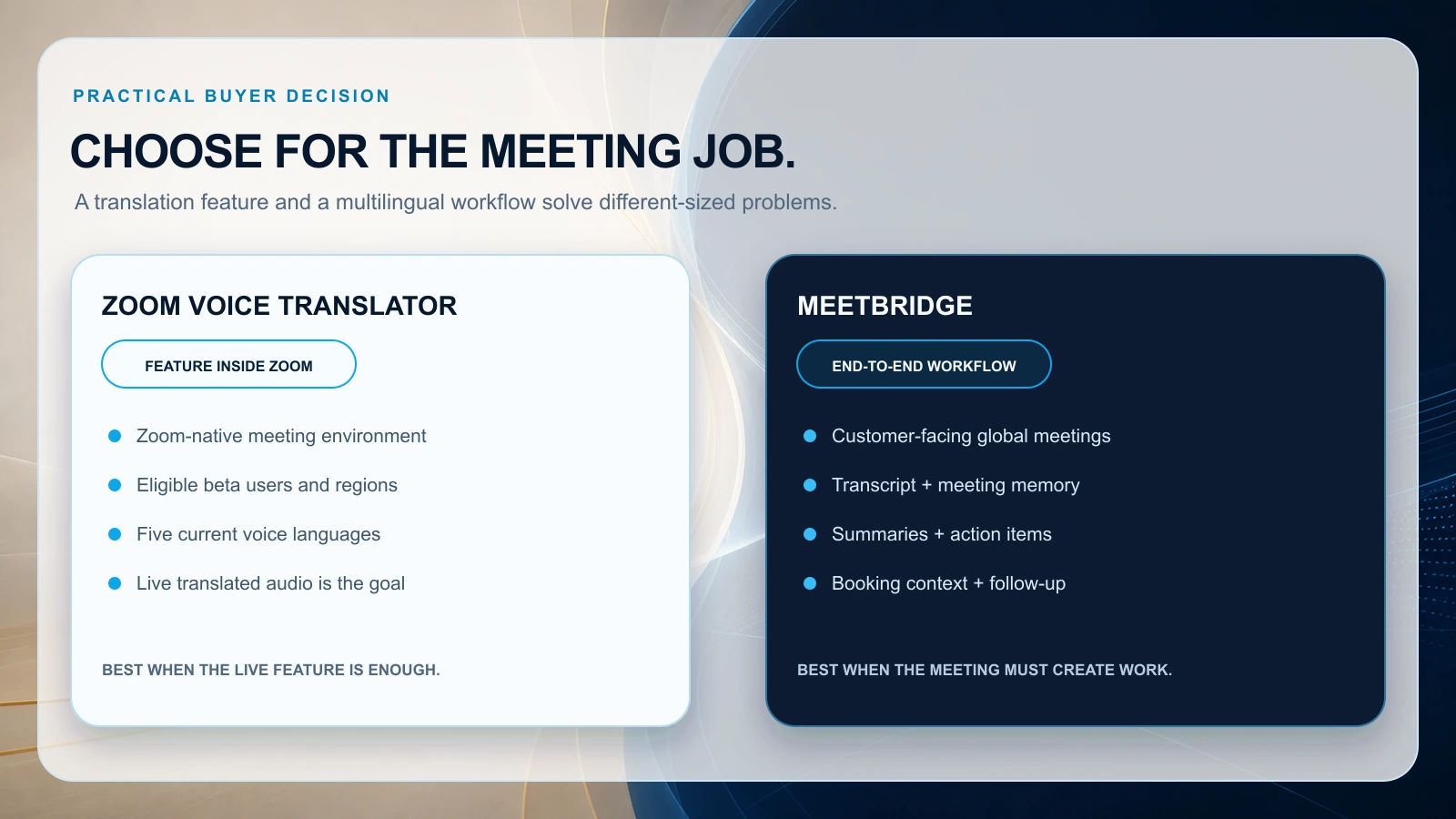
Zoom Voice Translator may be enough when the only need is to hear a supported language during an existing Zoom call. MeetBridge is stronger when the conversation needs to become a durable operational record.

Decision framework for choosing MeetBridge or Zoom Voice Translator by business use case

A practical decision framework

Use these five questions before choosing either product.

1. Are you choosing a translation feature or a meeting workflow?

If translation inside existing Zoom meetings is the entire requirement, start with Zoom Voice Translator. If meetings also need preparation, transcripts, summaries, action items, and follow-up, evaluate MeetBridge.

2. Do your language pairs fit the current product?

Check the exact source and target languages. Do not assume Zoom translated-caption support equals Voice Translator support. Test MeetBridge with your real language pairs and terminology as well.

3. What must exist after the meeting?

Write down the required outputs: transcript, summary, decisions, tasks, owners, deadlines, customer recap, internal handoff, or searchable history. Then test whether those outputs come from one connected record.

4. Who joins and from which devices?

Test employees, external guests, desktop users, and mobile participants. Current Zoom Voice Translator documentation requires Windows or macOS desktop app version 7.0.0 or later.

5. What is the real monthly volume?

Estimate translated hours across all sales, interview, onboarding, customer, and operations calls. A limited beta can prove value, but it may not represent production capacity or final cost.

How to run a fair pilot

A useful comparison should include the same meeting types, languages, and success criteria.

Step 1: Select representative meetings

Choose five to ten real scenarios, such as:

  • Sales discovery with an international prospect.
  • A product demo with technical terminology.
  • A candidate interview with long-form answers.
  • A customer onboarding or escalation call.
  • A supplier negotiation involving price and delivery.

Step 2: Define live-meeting metrics

Track:

  • Time until translated output is understood.
  • Number of repetitions and clarification requests.
  • Whether participants interrupt translated audio.
  • Confidence in names, numbers, dates, and technical terms.
  • Ease of joining and selecting a language.

Step 3: Define post-meeting metrics

Track:

  • Transcript usefulness.
  • Accuracy of the meeting outcome.
  • Decision and action-item clarity.
  • Time from meeting end to follow-up.
  • Number of manual tools or copy-paste steps.
  • Whether a colleague who missed the call can understand what happened.

Step 4: Review administrative fit

Include IT, security, legal, sales operations, HR operations, or procurement when relevant. A product can perform well in one demo and still fail the organization's rollout requirements.

Step 5: Compare total workflow cost

Include subscriptions, add-ons, translated hours, admin work, note cleanup, integrations, and clarification calls. The winning product is the one that produces the required business outcome with acceptable risk and repeatable effort.

For a wider checklist, read Real-Time Meeting Translator for Zoom, Google Meet, and Teams: What Actually Matters for Business Calls.

Final verdict: MeetBridge or Zoom Voice Translator?

Zoom Voice Translator is a promising choice for eligible Zoom-native teams that want to hear supported languages inside the Zoom desktop app. Its biggest strengths are familiarity, native placement inside Zoom, and speech-to-speech output. Its current limitations are equally clear: beta status, US-cluster availability, five listed languages, desktop requirements, limited evaluation hours, and unpublished post-beta add-on pricing.

MeetBridge is the better choice for teams whose multilingual meetings must create business progress after the live conversation. It brings translation, transcripts, meeting memory, summaries, decisions, actions, booking context, and follow-up into one workflow.

The practical verdict is:

  • Choose Zoom Voice Translator for a focused translation capability inside an existing, eligible Zoom environment.
  • Choose MeetBridge for recurring global business meetings where understanding, memory, accountability, and follow-up must stay connected.

If your team sells, hires, supports, consults, or operates across languages, explore MeetBridge, review MeetBridge pricing, or contact the MeetBridge team to discuss your meeting volume, language requirements, and workflow.

See the MeetBridge workflow

FAQ

Which is better, MeetBridge or Zoom Voice Translator?

Zoom Voice Translator is better for an eligible team that already uses Zoom and primarily wants translated speech inside a Zoom desktop meeting. MeetBridge is better for global business teams that also need transcripts, searchable meeting history, summaries, decisions, action items, booking context, and follow-up in one multilingual meeting workflow.

Is Zoom Voice Translator free?

Zoom currently describes Voice Translator as a beta available free to eligible customers for a 60-day evaluation. The reviewed documentation provides five hours every 30 days, for ten hours total. Zoom says the feature is expected to become a paid add-on after beta, but did not publish the future add-on price in the documentation reviewed on July 14, 2026.

Which languages does Zoom Voice Translator support?

The current Zoom Voice Translator beta documentation lists English, Chinese, French, Japanese, and Spanish. Zoom translated captions support additional languages, but translated captions and Voice Translator are different features.

Can I use Zoom Voice Translator on mobile or in the web app?

The current Voice Translator requirements specify Zoom desktop app version 7.0.0 or later on Windows or macOS. Zoom translated captions have different platform support. Check Zoom's current documentation before rollout because the beta requirements may change.

Does Zoom Voice Translator create transcripts and meeting summaries?

Voice Translator focuses on translated speech during the meeting. Zoom offers captions, transcripts, recordings, and AI Companion meeting summaries elsewhere in its platform, subject to the relevant plan, settings, and availability. Evaluate the full Zoom configuration rather than assuming every feature is included with Voice Translator.

Does MeetBridge host the meeting or work as a Zoom add-on?

MeetBridge provides its own multilingual meeting workflow. It connects the meeting room to booking context, live translation, transcripts, meeting history, summaries, decisions, actions, and follow-up. It should be evaluated as a purpose-built meeting platform, not simply as a Zoom caption plug-in.

Can MeetBridge replace Zoom for multilingual business calls?

MeetBridge can host multilingual business meetings in its own workflow. Whether it replaces Zoom depends on what your organization uses Zoom for beyond meetings, which devices participants use, and whether MeetBridge fits your required language pairs, security review, capacity, and guest experience.

Is AI meeting translation accurate enough for high-stakes calls?

AI translation can improve communication in many recurring business meetings, but accuracy varies by language pair, terminology, audio quality, accents, network conditions, and speaking style. Legal, medical, employment, safety, or financially sensitive decisions may still require a qualified interpreter or specialist human review.

How should we compare translation quality?

Use real meetings with real speakers and terminology. Test short questions, long answers, interruptions, numbers, dates, product names, and mixed-language moments. Then review both the live experience and the transcript, summary, decisions, and follow-up output.

What is the best Zoom Voice Translator alternative for business meetings?

MeetBridge is a strong Zoom Voice Translator alternative when the team needs more than translated audio. It is designed for live translation connected to meeting preparation, transcripts, searchable history, summaries, actions, and business follow-up.

Continue reading:

Official sources used for this comparison

Related posts