

Project Kickoff Meeting Agenda for Multilingual Clients
Start a client project with a clear plan. Copy a 60-minute kickoff agenda, see a worked example and prepare an invitation and follow-up for a multilingual team.
A project kickoff meeting brings your team and your client together before the work starts. The aim is simple: agree on what you will deliver, who will make decisions and what happens first.
When people speak different languages, those agreements need extra care. A client might approve a design while the delivery team thinks they have approved the launch. A clear agenda gives you time to catch that difference during the call.
Below is a 60-minute project kickoff meeting agenda, a copyable invitation and a worked example for an agency working with an international client. You can use them with your existing meeting tools. If you need live translation, the guide also explains how to choose a MeetBridge setup for the conversation and the follow-up.
Copy this 60-minute project kickoff meeting agenda
Use this agenda for a client project whose main terms are already agreed. Replace the examples with your own project details. Send the agenda and the current project brief before the meeting so people can prepare their questions.
| Time | Topic | Question to answer | What to write down |
|---|---|---|---|
| 0–5 minutes | Introductions and language check | Who is here, what is their role and can everyone follow the conversation? | Names, roles and preferred languages |
| 5–15 minutes | Project goal | What should be different when the project is finished? | One clear goal and how the client will judge the result |
| 15–25 minutes | Work included and excluded | What are we delivering in this phase? What belongs to a later phase? | Deliverables, exclusions and anything still awaiting a decision |
| 25–35 minutes | Responsibilities and approvals | Who supplies information, does the work and approves it? | A named person for each responsibility |
| 35–45 minutes | Dates and possible delays | What is the first milestone? What could prevent us from reaching it? | Target dates, required inputs and unresolved blockers |
| 45–55 minutes | First tasks and communication | What happens next, and where will we discuss progress? | First tasks, owners, due dates and the next check-in |
| 55–60 minutes | Read back the agreement | Does everyone understand the same plan? | Confirmed decisions and questions still open |
These timings are a starting point. If the project has several approval groups or complex language needs, allow a longer session or schedule a separate working meeting. Keep the closing review even if you have to shorten the presentation.
For a small project, you can use a 30-minute version: five minutes for introductions, five for the goal, ten for scope and responsibilities, five for dates and five for the closing review. Send background information in advance to make that shorter format practical.
Decide what the kickoff should achieve
A kickoff should leave the team ready to begin the first piece of work. It does not need to solve every detail of the project.
For example, a web agency may need agreement on the first six page layouts, the person who provides product information and the person who approves the designs. It can arrange a separate session for individual page copy.
Write one sentence at the top of the agenda:
By the end of this meeting, we will agree on the first deliverables, the people responsible and the next review date.
Then check each agenda item against that purpose. A long company presentation may be less useful than five minutes spent finding out who can approve the client's work.
Keep discovery and kickoff separate when the project is still undefined. If nobody knows what the client wants to achieve or what work has been purchased, use the next conversation to settle those questions first. For client workshops and scoping calls, see the consulting meeting guide.
Prepare the people and documents before the call
Invite the people who can explain the work or make a necessary decision. That usually means the client contact, your delivery lead, the main contributors and the relevant approver. Tell each person why you need them there.
If an approver cannot attend, identify which decisions must wait for them. An absent stakeholder should not become an assumed approval.
Share a short project brief with these details:
- The problem the project should solve.
- The deliverables for this phase and the work excluded from it.
- The current schedule, with tentative dates clearly marked.
- The documents people should review before joining.
- The questions you need the group to answer.
Ask participants which language they prefer to speak and which language they want for written follow-up. A client who reads English comfortably may prefer to explain a technical problem in German. Ask directly instead of guessing from their location.
If you use a booking link, collect only information that helps you prepare. Useful questions include “Which part of the project needs clarification?” and “Who will approve the first deliverable?” MeetBridge's booking links can collect language choices and custom answers with a meeting request. The host still reviews and approves the requested time.
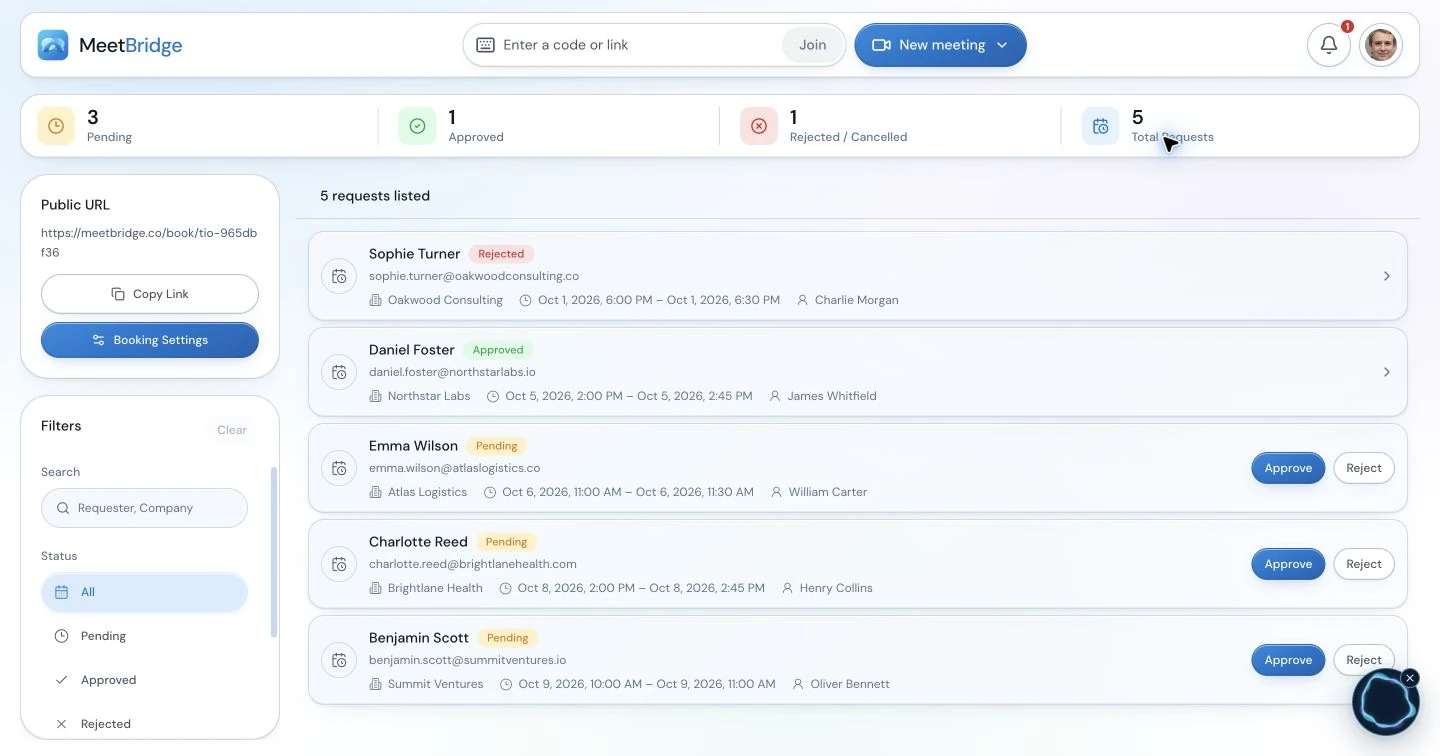
The booking workspace helps you manage requests before a meeting. This product capture does not show the fictional project used below.
For a broader preparation checklist, use the multilingual customer meeting guide.
Use plain questions to work through the agenda
The headings tell people what you will discuss. The questions help them give useful answers. Work through one topic at a time, especially when participants are listening to translated speech.
1. Start with the result the client wants
Ask, “What should your team be able to do when this phase is finished?” Follow with, “How will you decide whether we have delivered it?”
“Improve the website” is too broad to guide the first tasks. “Give our dealers an English and German catalogue with current product information” is more useful. The team can then discuss which pages, content and checks are needed.
Write the goal in a sentence the client recognizes. Ask them to correct it before you continue. You want their description of success, not simply agreement with your wording.
2. Make the scope visible
Put a short list of included and excluded work on screen. Refer to the agreed project brief or statement of work, using its current version.
Ask what each deliverable contains. “A bilingual website” could mean translated page text, two separate content reviews, translated downloadable files or all three. Resolve that difference before assigning the work.
If someone requests an addition, record it as a request. Name the person who will assess its effect on timing and cost. Follow your existing change-approval process before treating it as part of the agreed work.
3. Name the people who will do and approve the work
Ask three separate questions:
- Who will prepare this deliverable?
- Who will provide the information they need?
- Who will approve it, and what will they check?
“The client will send the content” leaves too much room for delay. “Anna will send the approved product descriptions by the agreed date” gives the delivery lead someone to contact.
One person can hold several roles. The important point is that the people involved know what they have accepted. If ownership is unresolved, mark it as unassigned and agree who will find the right person.
4. Separate a target date from a commitment
For each milestone, ask what must happen beforehand. A design review may depend on receiving product images. A launch may depend on the client's final approval.
Keep those conditions beside the date. “Launch target: 20 November, subject to final client approval” is clearer than a calendar entry that simply says “Launch: 20 November.”
Write dates with the month spelled out when people may use different date formats. For meetings and timed deadlines, include a named time zone. Ask participants to check the invitation in their own calendar rather than relying on a time mentioned aloud.
5. End with the first tasks
Choose tasks that can begin as soon as the meeting ends. Each task needs an owner, a specific result and an agreed due date. Leave the date open if the group has not settled it.
Agree where questions will go and when you will next review progress. If you use several communication tools, explain which one holds the current project plan. A message should not quietly replace an approved document without the team knowing.
In the last five minutes, read the decisions back. Ask each owner to confirm their task. Give the client space to explain any correction in their preferred language.
Example: an English-speaking agency and a German-speaking client
Imagine an agency preparing a catalogue website for a German manufacturer. The agency lead prefers English. The client's product manager prefers German. They have already agreed to start with six page layouts and content for two languages.
This is an illustrative project, not a customer case study. The dates and people below are fictional.
Before the kickoff, the agency sends the six-page list and the current project brief. The client adds its product manager and marketing approver to the invitation. Everyone can see the same list during the meeting.
The group uses the agenda to settle these points:
| Topic | Agreement from the kickoff |
|---|---|
| Goal | Prepare an English and German catalogue website that dealers can use to find current product information |
| First deliverable | Six page layouts with sample content for review |
| Outside this phase | Online ordering and translated downloadable brochures |
| Client input | Anna supplies the approved product descriptions and images by 30 October 2026 |
| Agency task | Sam prepares the first layouts for review on 6 November 2026, provided the agreed content arrives on time |
| Approval | Lena reviews the layouts; publishing the website needs a separate final approval |
| Launch | 20 November 2026 is a target; the group will confirm it after the layout review |
The most useful exchange comes when someone says, “Once the layouts are approved, we can go ahead.”
The agency asks, “Do you mean we can build the pages, or publish the website?” The client means the agency can build the pages. Publishing still needs a final check. The note becomes:
Approval of the layouts allows the agency to build the pages. The website can be published only after the client's separate final approval.
That sentence prevents two teams from following different plans. It also gives them a clear statement to preserve in the German follow-up:
Mit der Freigabe der Layouts darf die Agentur die Seiten umsetzen. Die Website darf erst nach einer gesonderten abschließenden Freigabe durch den Kunden veröffentlicht werden.
When preparing two language versions, check that both distinguish permission to build from permission to publish. The translation should preserve the agreement, even if the sentence structure changes.
At the end, Anna confirms the content task and Sam confirms the layout task. Lena confirms what she will review. The team records the launch as tentative. They leave with enough clarity to start the first work without claiming that every later step is settled.
Make the meeting easy to follow in every language
Share the page list, diagram or brief on screen. Use the same document version in every agenda item. A visible reference makes it easier to point to the exact deliverable being discussed.
Introduce unfamiliar terms before using them repeatedly. Explain whether “approval” means permission to start work, acceptance of a draft or permission to publish. Write product codes, amounts and dates where everyone can see them.
Speak in complete thoughts and allow time for the translated reply. Ask one question at a time. If a client is still listening, wait before moving to the next slide.
Use specific confirmation questions:
| Instead of asking | Ask |
|---|---|
| Is everything clear? | Which items will your team send before we start the layouts? |
| Is that date OK? | Is 6 November the first review date or the date of final approval? |
| Can we go ahead? | Are you approving the layouts for development, or approving the website for publication? |
These questions help you discover a misunderstanding while the right people are still in the meeting. For the speech and language options, see how MeetBridge live translation works.
Choose a meeting setup before sending the invitation
Decide where the conversation will happen and how you will prepare the notes afterward. With MeetBridge, there are two options.
| Your team's priority | Setup to consider | Preparation needed |
|---|---|---|
| Hold the call and review its saved transcript or AI summary afterward | Meet directly in MeetBridge | Confirm that the plan and enabled features include the saved record you need |
| Keep an existing Zoom, Teams or Google Meet call for video and screen sharing | Use a separate MeetBridge Voice room for the spoken conversation | Invite every speaker to Voice and assign someone to keep follow-up notes |
In a MeetBridge meeting, participants choose from the available languages, speak in their selected language and hear translated speech from people using another language. People using the same language hear one another directly. The product overview explains the complete workflow from preparation to follow-up.
MeetBridge Voice runs alongside your existing video call. The host creates the Voice room in the macOS or Windows desktop app. Invited guests can join in a supported browser or desktop app, and the host approves their entry. Guests do not need their own paid plan; room usage comes from the host's plan.
Every person who will speak must join the same Voice room. Switch off both the microphone and incoming meeting audio in the original video platform, then speak and listen through Voice. The original platform remains open for video, screen sharing and chat.
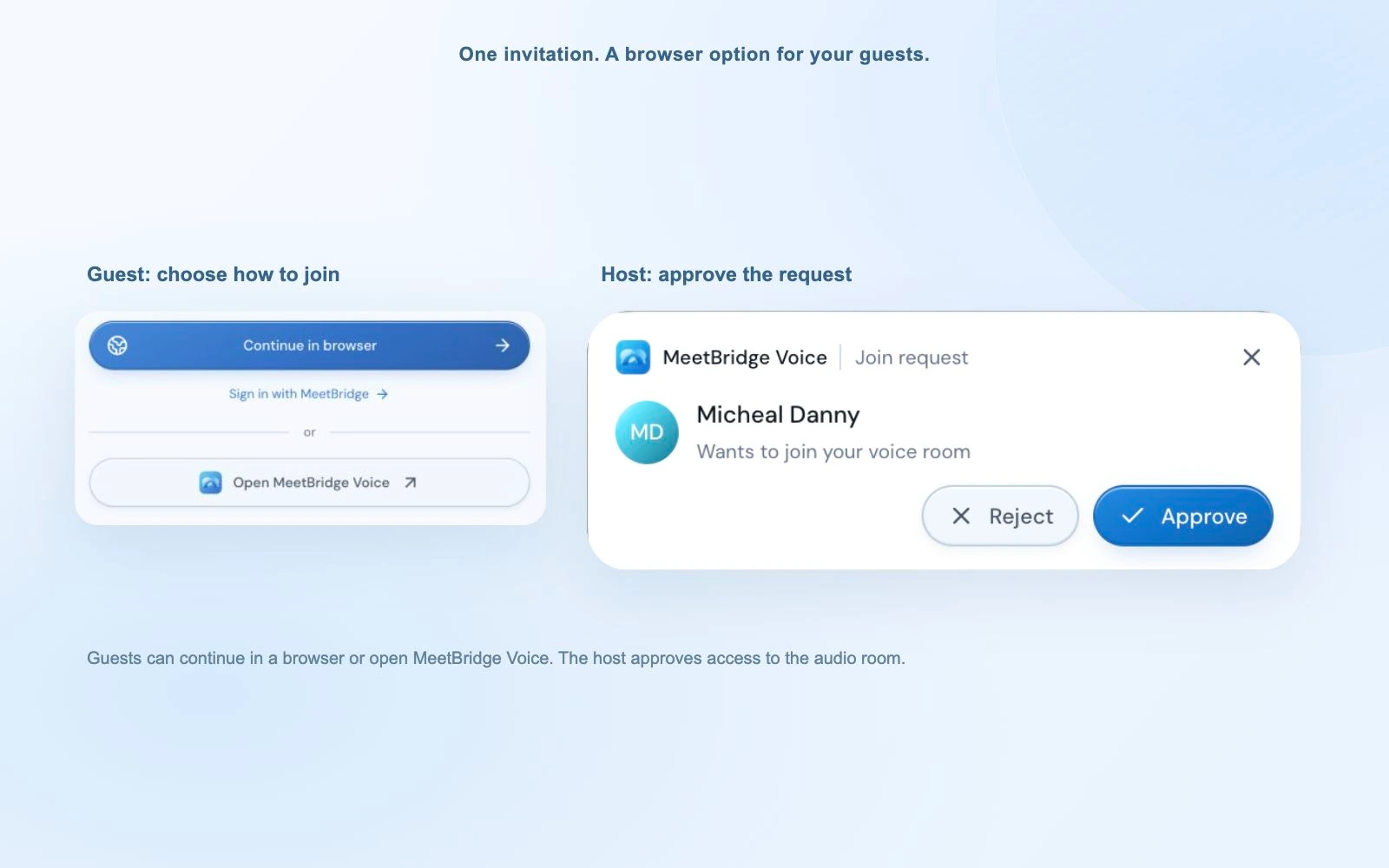
Voice guests join a separate conversation room. Admission to the video call does not admit them to Voice.
Use the setup guide for Zoom, Microsoft Teams or Google Meet when preparing the invitation. Voice's live transcript should not be treated as a guaranteed saved meeting transcript or AI summary. Plan your own notes when you use this route.
Copy this kickoff meeting invitation
Send the invitation in a language the recipient can comfortably read. Replace the bracketed fields and choose the joining instructions that match your setup.
Subject: [Project name] — kickoff meeting on [date] Hi [name], In this meeting, we will agree on the first deliverables, who will prepare and approve them, and our next review date. When: [Date, time and named time zone] Length: 60 minutes Languages: [Agreed speaking languages] Please review: [Current project brief and deliverable list] Agenda: Introductions; project goal; included and excluded work; responsibilities; dates and possible delays; first tasks; closing review. Please invite the person who will approve [first deliverable], or tell us before the call if they cannot attend. Let us know which language you prefer for the conversation and written follow-up. Join: [Meeting link and the instructions for your chosen setup] Thanks, [Host name]
For companion Voice, add this short paragraph:
We will keep [video platform] for video and screen sharing. Please also join [Voice invitation] for the conversation. Turn off your microphone and incoming audio in [video platform], then speak and listen through Voice. Our host will approve your Voice joining request.
If you are using a booking link to choose the time, explain that it sends a request for the host to approve. Send the confirmed meeting details after approval.
Send a short follow-up people can act on
Write the outcome before listing everything discussed. A useful kickoff recap tells each person what they need to do next.
For the agency example, a short email could say:
Thanks for today's kickoff. We agreed to start with six page layouts for the English and German catalogue website. Anna will send the approved product descriptions and images by 30 October. Sam will prepare the first layouts for review on 6 November, provided the content arrives on time. Lena will review the layouts. Layout approval allows the agency to build the pages. Publishing needs a separate final approval. The 20 November launch remains a target until we review the layouts. Please reply if any task, date or approval step differs from your understanding.
Use the meeting summary template when you need a fuller decision and task record. Keep the same people, dates and approval conditions in every language version you prepare.
If saved features are enabled for your MeetBridge meeting, review the transcript when you need to check what someone said. An available AI meeting summary can help you draft the recap, but check names, dates and commitments before sharing it. The saved summary follows the host's preferred language; additional language versions need to be prepared separately. It does not automatically fill in this agenda or assign tasks to your project software.
For a customer implementation that will continue into training and support, the customer success meeting guide covers the next stages of the relationship.
If you are choosing translation software, try one complete meeting
Use a familiar project discussion to evaluate the workflow before making it part of every client kickoff. Include the invitation, guest joining, conversation and follow-up in your review.
Agree what a useful result looks like for your team:
| What to assess | What to look for |
|---|---|
| Guest joining | The client can follow the invitation and join the right room |
| Language choices | The required languages are available and each speaker uses the correct setting |
| Conversation | Both sides can ask a question, hear the reply and correct a misunderstanding |
| Working materials | People can discuss the same page list or diagram while following the conversation |
| Meeting notes | The chosen setup provides the record you need, or the note owner can prepare it |
| Useful outcome | The team can name the first task, its owner and its approval step after the call |
Check current plans against the host usage, participant capacity and features your meetings require. A short successful exchange is useful, but it does not tell you whether a client can join easily or whether you can prepare the follow-up. Those are part of the buying decision too.
Frequently asked questions
What should a project kickoff meeting agenda include?
Include introductions, the project goal, included and excluded work, responsibilities, approvals, dates, possible delays and the first tasks. Reserve time at the end to read back the decisions and let participants correct them.
How long should a client kickoff meeting last?
The template above uses 60 minutes. A small project may need only 30 minutes if everyone has read the brief. Larger projects or several approval groups may need a longer session or separate working meetings. Choose a length that leaves time for questions and confirmation.
Who should attend a project kickoff meeting?
Invite the client contact, delivery lead, main contributors and people needed for the first approvals. If an approver cannot attend, record which decisions need their later confirmation.
How is a kickoff different from a discovery call?
A discovery call helps you understand the problem and whether a project makes sense. A kickoff organizes work the parties have agreed to begin. If the goal or purchased work is still unclear, settle it before treating the kickoff as permission to start delivery.
How do you run a kickoff when the client speaks another language?
Ask about language preferences before the call. Share a short brief and visible deliverable list, choose suitable language support, take turns and confirm specific decisions. Prepare written follow-up in an agreed language and check that it preserves the same tasks, dates and approvals.
Can we keep our existing Zoom, Teams or Google Meet call?
Yes. MeetBridge Voice can carry the spoken conversation in a separate room while the existing platform provides video, screen sharing and chat. Every speaker must join Voice. Turn off the original platform's microphone and incoming meeting audio, and plan your follow-up notes separately.
Will MeetBridge create this agenda and follow-up automatically?
This is a template for you to fill in. A MeetBridge meeting may provide a saved transcript and an AI summary, depending on the plan and enabled features. Review those before writing the follow-up. Companion Voice does not guarantee the same saved record, and the workflow does not promise automatic task assignment or external project-tool updates.
Bring the agenda to your next client kickoff
Start with the first deliverable. Make sure the client and your team can explain what it contains, who prepares it and who approves it. Use the rest of the agenda to give that first task a clear path forward.
To try the workflow with an international client, create a MeetBridge account. Choose a MeetBridge meeting when saved conversation and follow-up features matter, or download MeetBridge Voice when you want to keep your existing video call.