

Supplier Meeting Translation: A Practical Guide for Procurement Teams
A practical procurement guide to translated supplier calls: prepare an RFQ review, clarify MOQ, specifications and lead times, then confirm decisions and follow-up with reviewed meeting context.
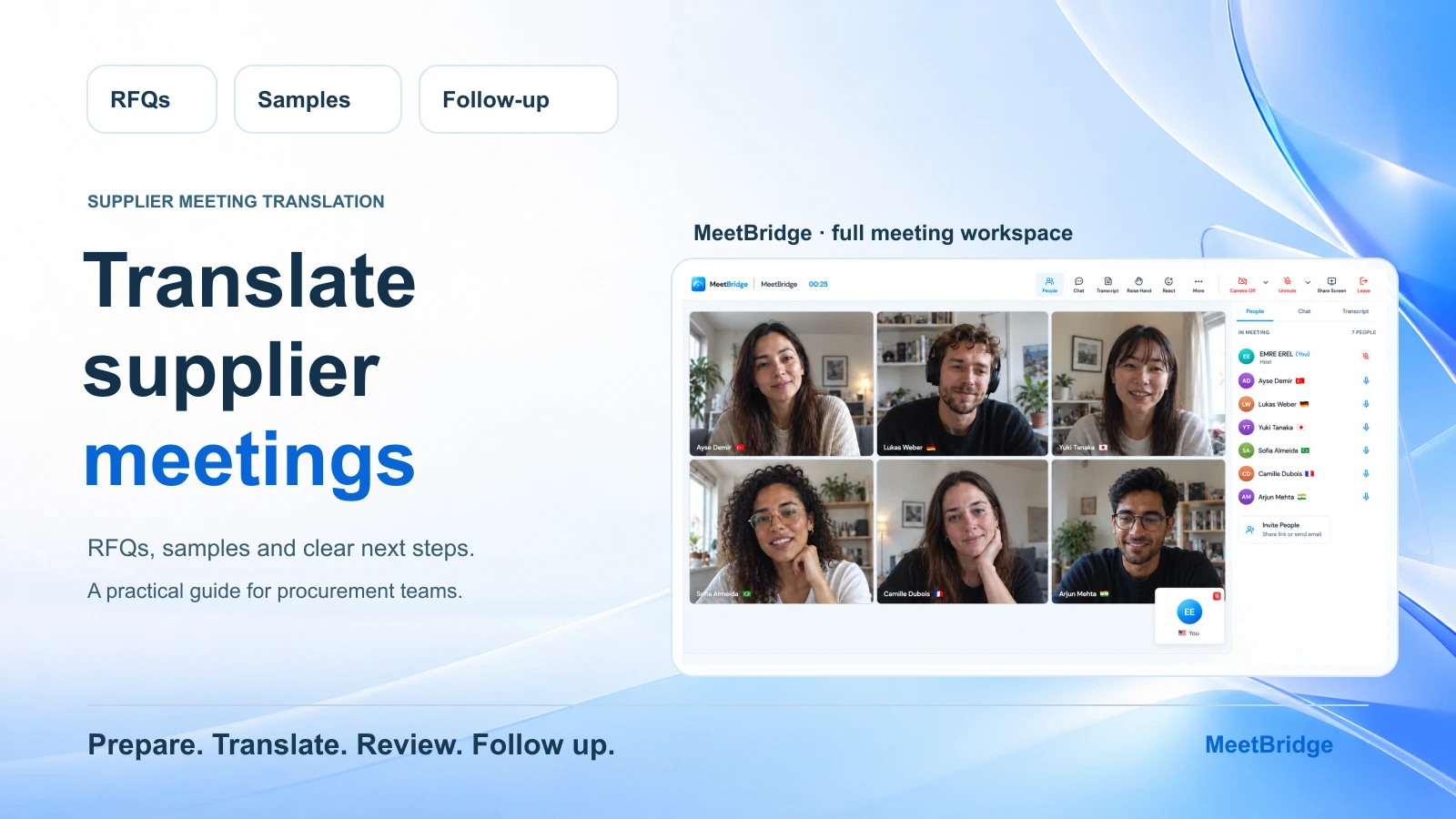
A supplier says the sample can be ready in two weeks. Your purchasing colleague hears that the order will be ready in two weeks. The quality engineer is still waiting for a revised drawing. Everyone understands the individual words, but the team is talking about three different milestones.
Supplier meeting translation helps people discuss an order across languages. A useful procurement meeting also needs a shared reference, clear questions and a written account of what was actually agreed. Translation makes the conversation accessible; the purchasing team still has to distinguish a quotation from an accepted price, a proposed change from an approved specification, and an estimate from a confirmed date.
This guide covers online supplier meetings: RFQ clarification, samples, minimum order quantities, production lead times and the handoff after the call. It includes an invitation, a 30-minute agenda and a follow-up template you can adapt to your own process.
The short version: choose the meeting workflow, identify the same RFQ and specification revision, invite the people who can answer the open questions, and confirm each important number with its unit and condition. End with a reviewed recap of decisions, open items, owners and dates.
For a meeting with video, live translation and available saved meeting context together, start with the main MeetBridge meeting workflow. If the supplier needs to keep Zoom, Teams or Google Meet, companion MeetBridge Voice is another route; its separate audio-room setup is explained later in this guide.
Start with the purchasing decision the meeting should support
“Discuss the new order” is too broad for a translated supplier call. Name the question the team needs to answer and what information is still missing. This helps you invite the right people and keeps the discussion from drifting into several unrelated orders.
| Meeting purpose | A question worth resolving | A useful written outcome |
|---|---|---|
| RFQ clarification | Is the supplier quoting the same product, quantity and specification revision we requested? | Clarified scope and a request for a revised quotation where needed |
| Sample review | What must change before the responsible person can approve the sample? | Identified changes, approval status and the next sample update |
| Order planning | Which quantity and production milestone can the supplier commit to? | Confirmed details or an explicit list of items awaiting confirmation |
| Production exception | What changed, which order lines are affected and what options remain? | A reviewed issue description and the next decision owner |
| Distributor review | Does a requested replenishment date mean goods ready, dispatch or receipt? | A named milestone, quantity and responsible party |
An early sourcing call and an order-change review need different agendas. On the first call, you may be learning how the supplier works. On a recurring review, the team may need to resolve one exception against an existing order. Keep unrelated product lines in separate agenda items so their quantities and conditions do not get mixed together.
If your work includes export, production and distributor coordination, the export and supplier meeting solution explains how these conversations fit into a broader team workflow.
Choose the meeting workflow before inviting the supplier
Decide where people will speak, where they will see the reference material and how the team will review the conversation afterward. These decisions should be clear in the invitation.
| Workflow | How the conversation works | What to plan before the meeting |
|---|---|---|
| Full MeetBridge meeting | Participants join the MeetBridge meeting and choose their spoken language and translated playback options | Confirm languages, joining requirements, the host's plan and enabled saved-meeting features |
| Existing video platform with MeetBridge Voice | Zoom, Teams or Google Meet retains video and shared material; all speakers join a separate Voice room for translated conversation | Send both invitations, prepare the macOS or Windows host app and configure one audio path |
| A platform's native translation features | Participants use the features available in that platform | Check the required languages, participant access, devices and account requirements |
For procurement teams that need to revisit an explanation or prepare a reviewed recap, the full MeetBridge meeting is a useful starting point. Its available saved transcript, chat, timeline and summary give the meeting owner context after the session. Availability depends on the plan and enabled features; confirm that before making the record part of your order-review process.
Check the required language choices with every speaker, including the factory engineer or quality contact who may join only for one agenda item. The supplier's country and the language of the quotation do not tell you which language that person wants to use in the meeting. The live translation guide explains participant language choices.
When evaluating tools, compare the whole meeting path: joining, spoken translation, the available record and the work needed to prepare a follow-up. The MeetBridge vs JotMe Voice comparison and MeetBridge vs Maestra comparison help frame that choice.
Prepare one reference pack for the conversation
Send the reference material through your team's normal document-sharing process before the call. Give each file or item a recognizable identifier. “The latest drawing” can mean different things to two teams with different inboxes.
Prepare these details:
- RFQ or purchase-order reference, product code and the specific line being discussed.
- Specification or drawing revision and its date.
- Requested quantity and unit, such as pieces, cartons or kilograms.
- The supplier's quotation version, currency and price basis.
- Sample status, open quality questions and the person who can approve the next step.
- Required milestones and the question attached to each date.
- Participant names, preferred languages and the decision each person can make.
Keep codes, dimensions and numbers in writing. A spoken abbreviation can be translated correctly as ordinary language while losing its meaning as a material or model identifier. Place the exact reference beside the question and ask the other person to point to the same item.
For a new supplier, spell out terms such as “request for quotation” and “minimum order quantity” the first time you use them. Share a short terminology note with the participants so they can prepare the same product names and abbreviations before the meeting.
If suppliers need to request a meeting time, MeetBridge booking links can collect language, purpose and custom intake answers. Ask for the RFQ reference and the main open question. A submitted booking request remains pending until approved; approval creates the scheduled meeting and invitation.
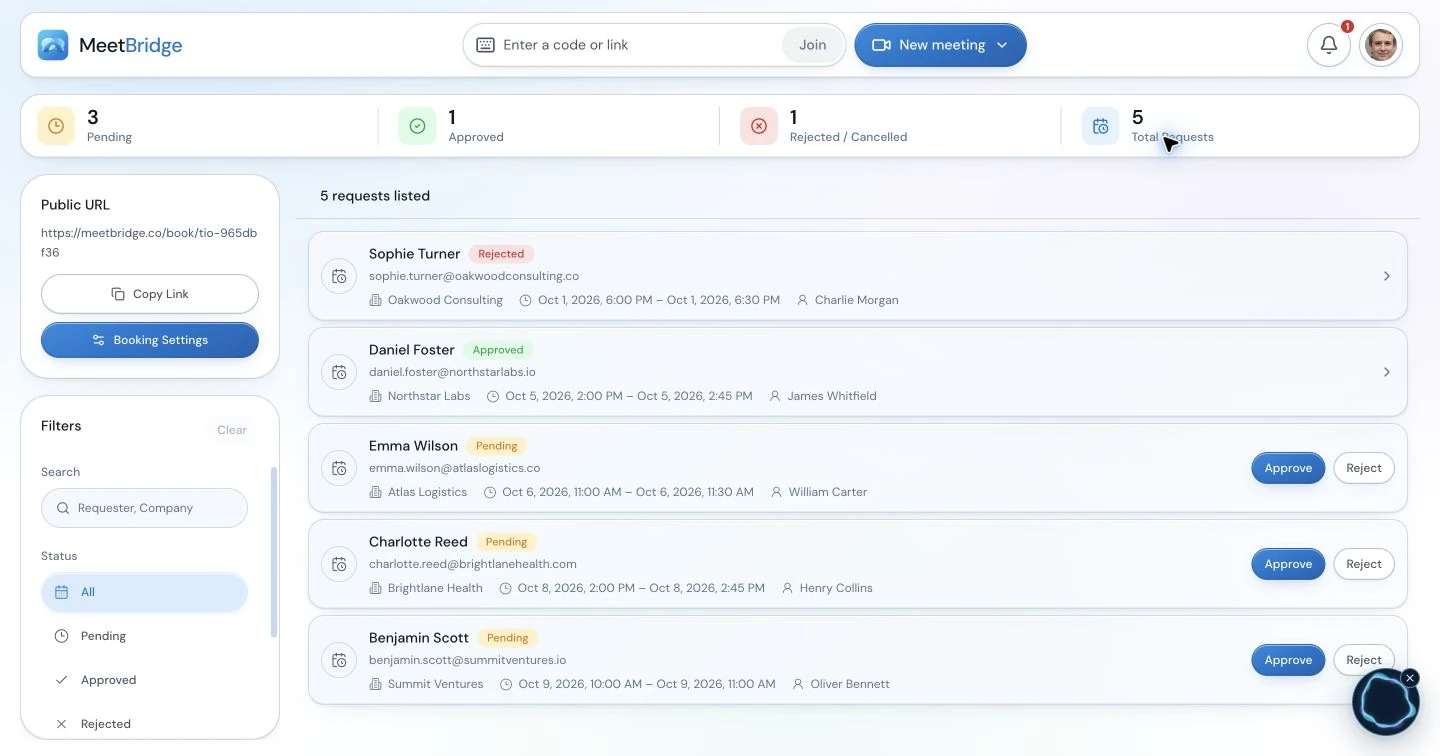
The booking workspace illustrates meeting intake. Collect the supplier's context before approving a request; this product capture is not a real procurement booking.
Send an invitation that explains the purpose and joining route
Use a short invitation with the reference, expected outcome and language question. Avoid making the supplier infer the agenda from a calendar title.
Supplier meeting invitation template
Subject: Supplier review — [RFQ/order reference] — [product or line]
We would like to review [specific question] using [specification/drawing revision] and [quotation reference]. Our goal is to confirm [the information or decision needed] and identify any items that still require approval.
The meeting is planned for [date, time and time zone]. Please join using [MeetBridge meeting invitation]. Let us know which language each participant prefers and whether your production or quality colleague should attend.
Please have [reference material] available. We will begin with a brief language and audio check, then work through the attached agenda. We will send a written recap of the confirmed details and open actions afterward.
Replace every bracketed field before sending. Ask who can confirm the quotation, who can explain the technical requirement and who can approve a sample. One supplier contact may coordinate all three without being authorized to make each decision.
Keep the start time and time zone together. If the participants use different calendars, ask them to confirm the time they see. The broader multilingual customer meeting checklist is useful for joining and preparation details that also apply to supplier calls.
Use a 30-minute agenda that leaves time for confirmation
You can adapt this agenda for an RFQ and sample review. Share it with the invitation so the supplier can bring the answers or the right colleague.
| Time | Agenda item | Question to answer |
|---|---|---|
| 0–3 minutes | Joining, language and reference check | Can everyone hear the conversation and identify the same RFQ, product and revision? |
| 3–8 minutes | Scope and specification | What is included in the quotation, and which requirements need clarification? |
| 8–15 minutes | Quantity and quotation | What does the MOQ apply to, and what quantity, currency and price basis are being discussed? |
| 15–22 minutes | Samples and lead time | What needs approval, what starts the lead-time clock and which milestone is estimated? |
| 22–27 minutes | Open issues and next actions | Who will provide each missing answer, and when? |
| 27–30 minutes | Written recap and read-back | Does each party agree with the wording, status and conditions of the recap? |
Assign one facilitator to move through the questions and one person to capture the written recap when possible. Invite the technical specialist to answer the specification question directly. Let the translated answer finish before someone else adds a correction.
At the start, try a short two-way exchange tied to the task: “Which quotation revision do you have open?” The answer checks both the conversation and the shared reference. Resolve an audio or document mismatch before discussing a price or commitment.
Clarify the RFQ, MOQ and quotation one detail at a time
A minimum order quantity is incomplete without knowing what it applies to. Ask whether it is per model, size, color, packaging variation or total order. Then confirm the unit. “Six hundred” could mean six hundred pieces or six hundred cartons.
Useful questions include:
- “Does this minimum apply to each variant or to the combined order?”
- “Is the quotation for the requested revision and packaging?”
- “Is this price per piece, set, carton or another unit?”
- “Which currency and quantity tier does the price use?”
- “Are tooling, samples or packaging listed separately?”
- “Which items need a revised written quotation?”
Keep the supplier's quoted basis attached to the amount. A discussion about a lower unit price does not establish that the same packaging, quantity or other conditions still apply. Ask the supplier to identify any changed assumptions and reflect them in the quotation your team will review.
Use a short table on screen or in the written recap:
| Field | Illustrative wording to confirm |
|---|---|
| Product and revision | Part MB-42, drawing revision C |
| Requested quantity | 1,200 pieces in one specified variant |
| MOQ | 600 pieces per variant; supplier to confirm in the quotation |
| Price | EUR 4.80 per piece for the quoted quantity and scope |
| Separate item | Sample charge to be stated in the revised quotation |
| Status | Quotation clarification; purchase approval remains open |
These are fictional examples, not an offer or a customer result. Replace them with the actual references and ask the supplier to confirm the wording. Your normal quotation and purchasing approval process determines what is accepted.
Keep sample approval separate from a specification change
When a supplier discusses an alternative material or dimension, pause and identify its status. Is it a question, a proposed change or an already approved revision? Use the same drawing or specification reference for the answer.
For example:
We are reviewing revision C. The material substitution is a proposal. Our quality engineer still needs to review it before we can approve a revised sample. Can you send the proposed material code and the affected requirement in writing?
Ask what the sample is intended to demonstrate and who will review it. Record whether approval is waiting on a measurement, a photo, a test result or another item in your own process. Avoid closing the agenda item with “sample approved” when the team only agreed to review a new sample.
Keep an unresolved requirement visible in the recap. Translation helps the supplier explain a production constraint, while the responsible team decides how that constraint affects the specification. An exploratory conversation should not silently become an instruction to manufacture a different product.
Read back dates with the milestone and its condition
“Three weeks” needs a starting event and a finishing event. Ask when the period begins and what will be ready at the end. Separate working days from calendar days when the supplier uses either term.
Use a complete question:
When you say 15 working days, does that start after written sample approval, and does it mean production complete rather than dispatch?
Then write the supplier's answer beside the relevant item and read it back. A useful confirmation contains:
- The product or order reference.
- The quantity and unit.
- The named milestone.
- The date or duration and the event that starts it.
- Any condition that still needs to be met.
- Whether the statement is an estimate or a confirmed commitment.
If a distributor joins the review, ask which date their customer needs and which milestone the supplier is describing. Record both questions separately until the responsible people confirm how they connect. “Goods ready” and “customer receipt” should not be merged into a single “delivery date” in the recap.
The same read-back method works for quantities: “To confirm, the request is 1,200 pieces, not 1,200 cartons, and the quantity is for one variant.” Give the other party an opportunity to correct it before moving on.
An illustrative RFQ-to-sample conversation
Imagine an English-speaking purchasing lead discussing a component with a supplier contact who prefers Turkish. A quality engineer joins to clarify the sample requirement. They use a full MeetBridge meeting, with each participant choosing their language from the available options.
The purchasing lead asks whether the quoted lead time covers the requested 1,200 pieces. The supplier explains that the period begins after sample approval. The quality engineer then points out that the sample under discussion uses a proposed material, while the RFQ still references the original specification.
Instead of asking the supplier to “confirm delivery,” the facilitator separates the questions:
First, which material and revision does the current quotation cover? Second, what information do we need to review the proposed sample? Third, when the sample is approved in writing, which production milestone does the quoted lead time describe?
The group agrees that the supplier will send an updated quotation and the proposed sample details. The quality engineer will review those details before sample approval. The purchasing lead keeps the production timing conditional on that approval, then asks the supplier to confirm the milestone in the updated quotation.
After the call, the meeting owner uses the available saved context to review the exchange and writes a recap that preserves the condition. The action is to provide and review missing information; the meeting has not approved a purchase or a material change.
This is a fictional operating example. It illustrates the questions and review process, rather than a recorded supplier call or a measured accuracy, speed or business outcome.
Review the meeting record before writing the supplier recap
In a full MeetBridge meeting, the available saved record can include transcript entries with speaker names and times, chat, timeline context and a post-meeting summary. Start with the right meeting and its participants, then review the passage behind any important commitment.
Use the summary to recover the main thread. Use the transcript to check the detail. Search within the opened meeting for the product code, “sample,” “quantity” or another relevant term, then read the surrounding exchange for a later correction or condition.
The transcript can show original text and available saved translations. Comparing those views can help investigate ambiguous wording; it does not create a translation that was never captured. Exact identifiers from the quotation or specification should remain attached to the recap.
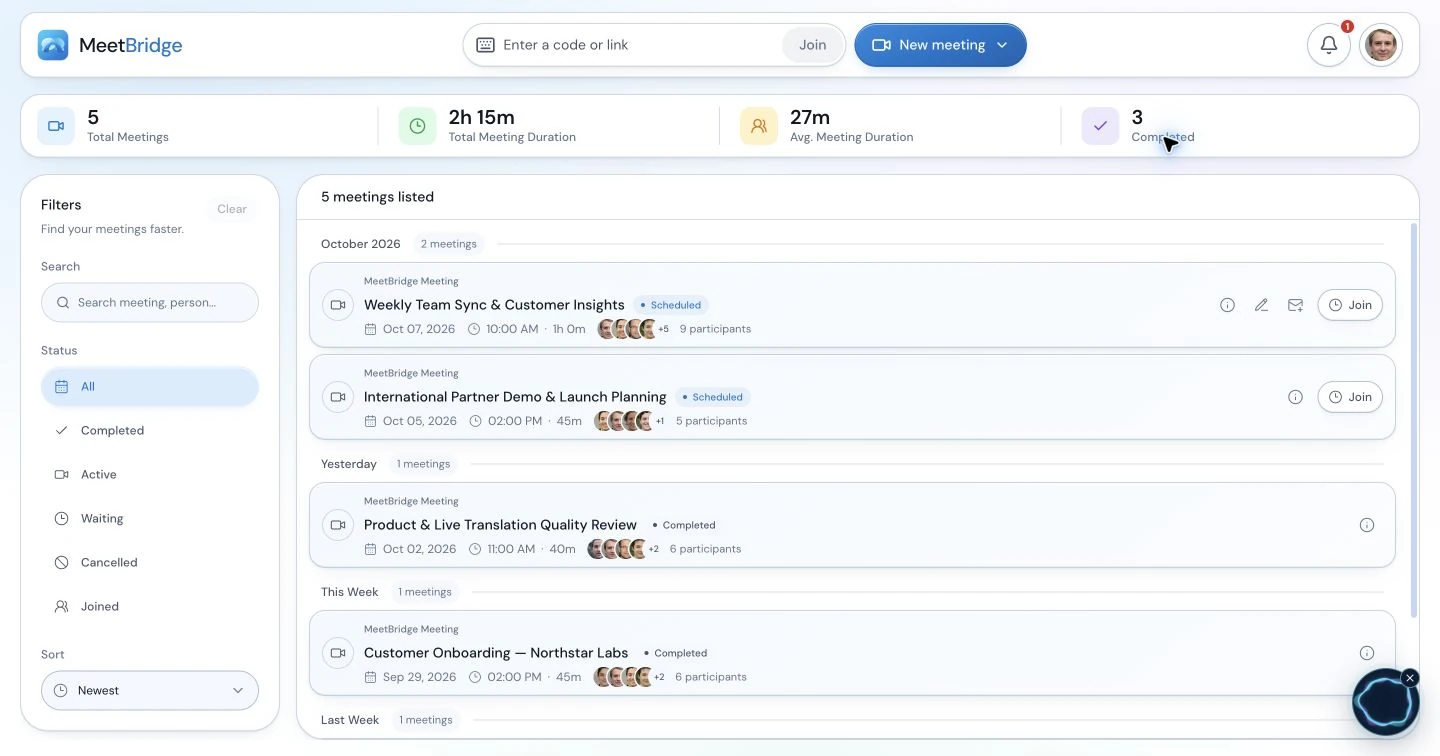
Open an accessible meeting from the MeetBridge workspace to review its available saved context. This screen illustrates meeting history; it is not a supplier transcript or a guarantee that every plan includes every saved feature.
The transcripts and meeting memory guide explains how to find and review saved context. The meeting summaries and actions guide explains how to turn an available recap into human-reviewed follow-up.
A summary of the conversation is not the supplier's revised quotation, sample approval or purchase order. Verify figures and conditions with the participants, then carry confirmed information into your team's existing documents and systems. Give each action an owner, an expected output and an agreed time; keep a missing owner or date open until someone confirms it.
Send a follow-up that separates decisions from open items
Send a concise recap soon enough that the participants can correct it while the conversation is familiar. Make the status of each statement visible. “Discussed,” “proposed,” “confirmed” and “awaiting approval” carry different meanings.
Supplier meeting follow-up template
Subject: Review recap — [RFQ/order reference] — [meeting date]
Thank you for reviewing [product/line] with us. We used [specification revision] and [quotation reference]. Please review the details below and correct any wording that does not reflect our discussion.
Confirmed during the call
- [Quantity and unit, with any relevant variant or scope.]
- [Confirmed reference or requirement, including its status.]
Proposals and items awaiting approval
- [Proposed change, the person or team reviewing it, and the information still needed.]
- [Estimated milestone or timing, preserving its starting event and conditions.]
Next actions
- [Supplier contact] will send [specific document or answer] by [agreed date and time zone where relevant].
- [Purchasing/quality owner] will review [specific item] and provide [expected response] by [agreed date].
Next review
- [Meeting or written-update date] to resolve [open question].
Please confirm the commercial details in [the revised quotation/order document used by your team]. We will process approvals and any order changes through our normal workflow.
Remove sections that do not apply. If the supplier did not accept a deadline, write “timing to be confirmed” and ask for it. If a technical point remains unresolved, quote the question rather than summarizing it as an agreement.
Transfer reviewed updates through the team's usual sourcing, ERP or order process. This meeting workflow does not automatically update those systems or approve the next purchase.
If the supplier keeps Zoom, Teams or Google Meet
MeetBridge Voice is the companion option when the existing video invitation needs to stay. The host creates a Voice room in the desktop app and shares that invitation with every speaker alongside the video meeting link. Guests can continue in a supported browser, enter their name and request admission; the host approves them. Voice usage comes from the host's plan.
MeetBridge Voice is available on macOS and Windows. Prepare the host's desktop app and confirm the supplier's supported browser or joining device before sending the invitation. Get the app from the download page, or contact MeetBridge about your team's setup.
Keep the existing platform for video, chat and shared documents. Every person who needs the translated conversation must also be in the same Voice room. Selecting a platform in Voice does not import the supplier's participants or connect their accounts.
Use one conversation audio path: disconnect Zoom computer audio, or turn off the Teams microphone and incoming audio. In Google Meet, turn off its microphone and disable sound specifically for the Meet site while keeping browser Voice audible. Follow the detailed instructions in the Zoom, Microsoft Teams or Google Meet guide.
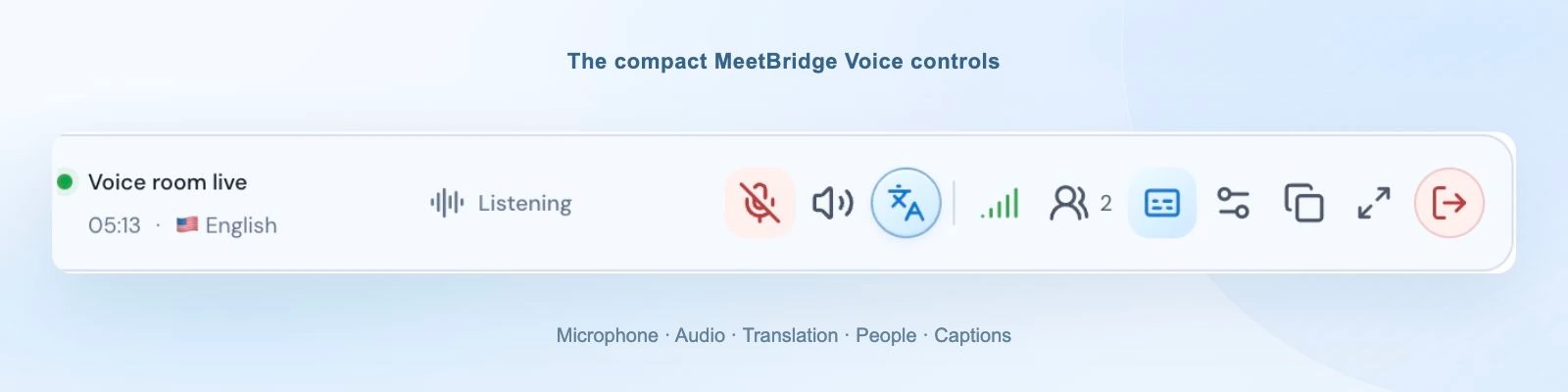
The desktop Voice bar keeps conversation controls available beside the supplier's reference material. Browser guests use the expanded Voice room; this product capture is not a recorded supplier call.
Plan the written record separately for this route. Voice supplies live session context; it does not promise the same saved transcript and post-meeting summary as the full MeetBridge workflow. Because the video platform's audio is disabled, do not assume its recording contains the translated conversation.
The sales-call setup guide provides a detailed companion-room walkthrough. Use those joining and audio steps, then replace its demo agenda with the procurement questions in this article.
Fix the uncertainty before moving to the next agenda item
| What happens | The next useful step |
|---|---|
| The teams have different specification versions open | Pause, identify the correct revision and confirm that everyone is looking at it |
| A material code or product name sounds wrong | Write the exact identifier and ask the speaker to confirm it |
| The supplier states a quantity without a unit | Confirm pieces, sets, cartons or the actual unit, plus the variant it applies to |
| “Three weeks” is unclear | Ask for the starting event, finishing milestone and whether the period is estimated |
| A proposed change appears as an agreement in the recap | Check the exchange, preserve approval status and ask the responsible person to confirm |
| Several people answer at once | Let the facilitator select one speaker, wait for translation and then invite the correction |
| A specialist joins the video meeting late during a Voice call | Invite and admit them to the same Voice room, confirm their language and try a short exchange |
| The summary is pending or unavailable | Review the available transcript directly and confirm missing details with the participants |
If the conversation or reference cannot be made clear, leave the item unresolved and agree on the next written answer or meeting. A visible open question is more useful than a confident recap of an uncertain statement.
FAQ
What is supplier meeting translation?
Supplier meeting translation makes the spoken discussion accessible across languages during an online supplier call. Participants can discuss requirements, quantities, sample status and production timing in their chosen languages. They should still confirm exact references and important details in writing.
Can procurement teams use MeetBridge for multilingual supplier meetings?
Yes. The main MeetBridge product is a multilingual meeting application. A host can create an instant or scheduled meeting and invite participants, who choose their language and translated playback options. Confirm the required languages, joining requirements, plan and enabled features before the supplier review.
Can I translate a supplier call while keeping their Zoom, Teams or Google Meet link?
The companion MeetBridge Voice workflow keeps that platform for video and shared material while carrying the conversation in a separate translated audio room. Every speaker joins Voice, and the original platform's microphone and incoming audio are disabled. Prepare the host's macOS or Windows app, supported guest devices and the platform-specific setup first.
How should I discuss MOQ and production lead time across languages?
Write the minimum quantity with its unit and the product variant it applies to. For lead time, ask what event starts the period, what milestone ends it and what conditions remain. Read the complete statement back and ask the supplier to reflect the details in the appropriate written document.
Can MeetBridge help prepare supplier meeting notes and follow-up?
A full MeetBridge meeting can provide saved transcript context and a post-meeting summary, depending on your plan and enabled features. The meeting owner reviews the available record, checks important statements with the participants and writes the follow-up. The summary supports that work; it does not automatically approve a purchase or assign and track procurement tasks.
Does a translated conversation approve a quotation or a specification change?
Use your normal review and approval process. Keep a proposal, a confirmed fact and an approved change distinct in the meeting recap. Ask the responsible person to confirm commercial details and approval status in the quotation, specification or order document your team uses.
How is this different from a multilingual sales demo?
A sales demo explores a buyer's needs and demonstrates a product. A procurement review works against an RFQ, quotation, specification or order and resolves details such as MOQ, sample approval and production milestones. The joining and translation setup can be similar, while the questions and follow-up documents are different.
Prepare your next supplier review
Choose one familiar supplier discussion with a clear question: a quotation mismatch, a sample approval or an uncertain milestone. Identify the reference, confirm participants' languages and prepare the closing table before the meeting starts.
Use the export and supplier meeting solution to choose the workflow, and review current plans for the features your team needs. For a recurring procurement process, contact MeetBridge with your language pairs, participant devices and meeting-record requirements.